
Hey all, I've been recently been trying to make some levels , but when I open D3 edit, this is what appears:
http://www.youtube.com/watch?v=-PcF5WmDBhE
I recommend you switch to 720P and view it in fullscreen.
No doors, faces ETC?
-
SoulRunner

- DBB Ace

- Posts: 27
- Joined: Sat Jun 12, 2010 7:15 pm


You need to select a \"type\" of door. Click one of those little squares on to the right. Also, you will want your viewing size to be medium. (for starters as you're new to this)
Also, I recommend getting rid of some of those tool bars. Use only the menus you need at that time or you won't be able to see your work.
hope that helps.
Also, I recommend getting rid of some of those tool bars. Use only the menus you need at that time or you won't be able to see your work.
hope that helps.
-
SoulRunner
- DBB Ace
- Posts: 27
- Joined: Sat Jun 12, 2010 7:15 pm

-
SoulRunner
- DBB Ace
- Posts: 27
- Joined: Sat Jun 12, 2010 7:15 pm
 Sorry for my noobiness.
Ok, Home now.
In the texture and door menus on the right hand side of the screen, there is a menu on the right with white check boxes called \"Display Filter\". These boxes turn various categories on and off as there are quite a few. There are nearly 1000 textures total in D3. So you don't have to look through each and every one of them, they broke them up a bit into categories. Same with the doors.
With no boxes checked, they are turned off.
Be aware that doors are a room unto themselves. They need to have lighting textures normally to be lit/seen well. Fly around D3 solo and notice how doors, halls and the like are lit and how lighting spreads out.
Keep posting. It takes a bit to get a handle on it all, you'll get there.
In the texture and door menus on the right hand side of the screen, there is a menu on the right with white check boxes called \"Display Filter\". These boxes turn various categories on and off as there are quite a few. There are nearly 1000 textures total in D3. So you don't have to look through each and every one of them, they broke them up a bit into categories. Same with the doors.
With no boxes checked, they are turned off.
Be aware that doors are a room unto themselves. They need to have lighting textures normally to be lit/seen well. Fly around D3 solo and notice how doors, halls and the like are lit and how lighting spreads out.
Keep posting. It takes a bit to get a handle on it all, you'll get there.


-
SoulRunner
- DBB Ace
- Posts: 27
- Joined: Sat Jun 12, 2010 7:15 pm
Hmm, I really don't know what I'm doing wrong here:

I selected \"mines\" and waited like 10minutes and nothing showed up.(Yes I had a room open and textured it with the default texture)
In case your wondering I've been using this guide:
http://www.gameedit.net/custom/GameEdit ... 3edit.html
I selected \"mines\" and waited like 10minutes and nothing showed up.(Yes I had a room open and textured it with the default texture)
In case your wondering I've been using this guide:
http://www.gameedit.net/custom/GameEdit ... 3edit.html
It is me, Slingshot! This is my other screen name
Did you set up the editor when you installed it? That is, you need to point the editor at certain D3 files when you first install. The various Hog files and it will also ask you for script sources - don't worry about that yet.
I don't have the editor in front of me as I'm at work. It should be in something File > Preferences or something like that. Maybe Settings. This isn't for the level, but for the editor itself.
Also, what OS are you running?
I don't have the editor in front of me as I'm at work. It should be in something File > Preferences or something like that. Maybe Settings. This isn't for the level, but for the editor itself.
Also, what OS are you running?
-
SoulRunner
- DBB Ace
- Posts: 27
- Joined: Sat Jun 12, 2010 7:15 pm
-
Alter-Fox

- The Feline Menace
- Posts: 3164
- Joined: Thu May 24, 2007 12:49 pm
- Location: the realms of theory
- Contact:
You need to point D3 edit at your Descent 3 folder.
Go to file, settings.
At the bottom where it says Descent 3 directory, browse for the path. Alternatively you could just enter it in... in your case it's C:\\Games\\Descent3\\ (from watching your video).
Don't worry about the other stuff there yet.
Go to file, settings.
At the bottom where it says Descent 3 directory, browse for the path. Alternatively you could just enter it in... in your case it's C:\\Games\\Descent3\\ (from watching your video).
Don't worry about the other stuff there yet.
-
SoulRunner
- DBB Ace
- Posts: 27
- Joined: Sat Jun 12, 2010 7:15 pm

Here's where the Path is layed out. Select the \"d3.hog\" file.
Clik!
(the images are huge so I'm linking them)
Once that's done, open up a default room. Iirc, you need to have a global view open as well as room view for textures to work. ... that might have been an older version though.
like this Clik!
Select the CHOOSE button (as you know) and drag and drop the textures you want into the box on the lower right entitled \"custom\".
Clik!
Clik!
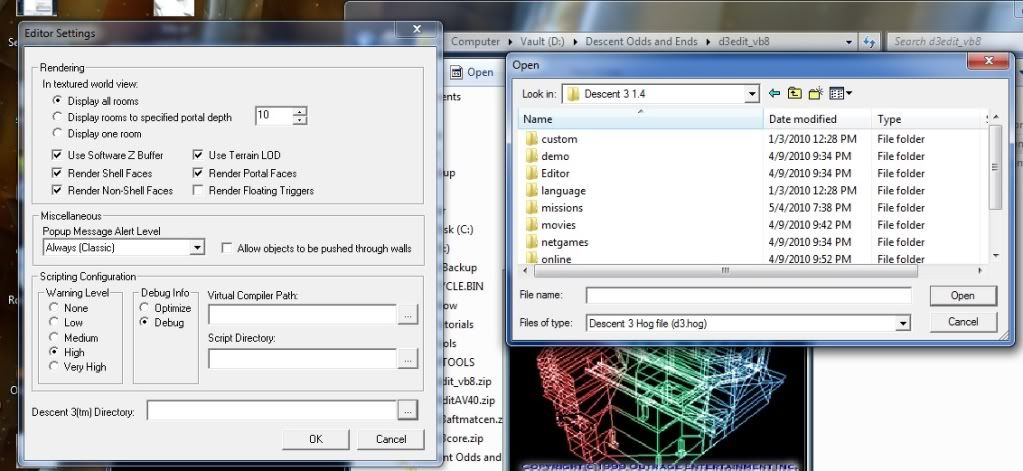
(the images are huge so I'm linking them)
Once that's done, open up a default room. Iirc, you need to have a global view open as well as room view for textures to work. ... that might have been an older version though.
like this Clik!
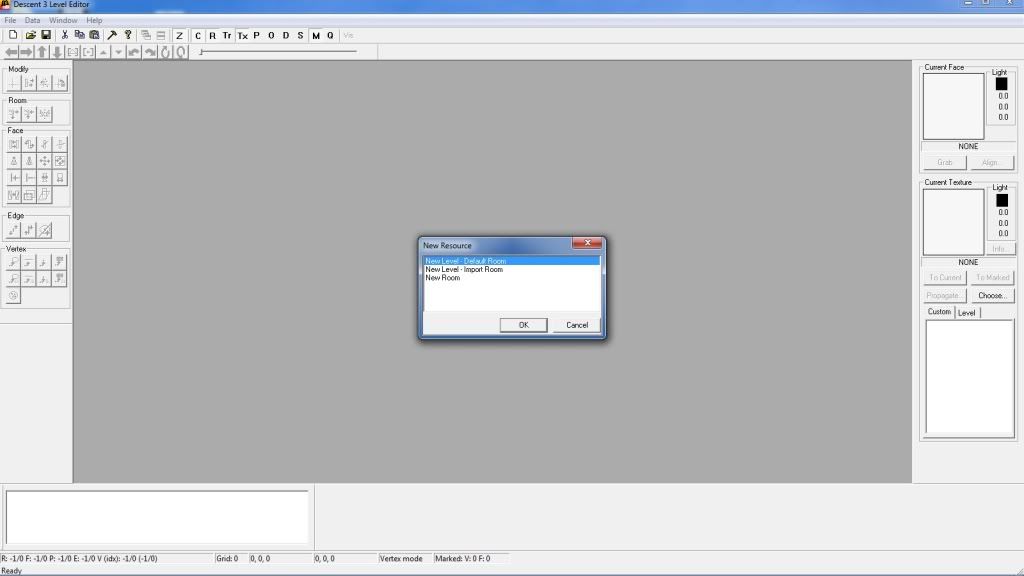
Select the CHOOSE button (as you know) and drag and drop the textures you want into the box on the lower right entitled \"custom\".
Clik!
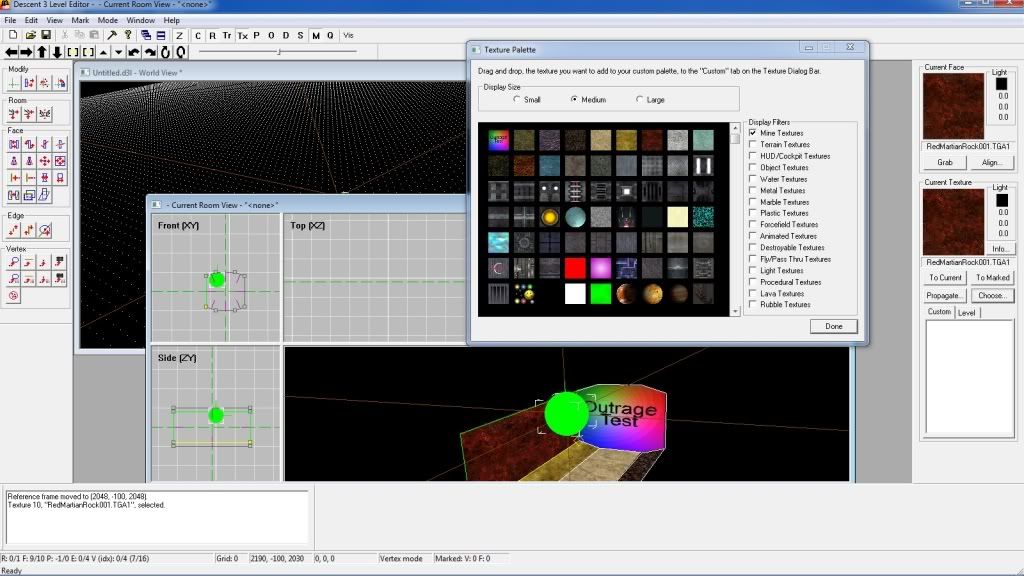
-
SoulRunner
- DBB Ace
- Posts: 27
- Joined: Sat Jun 12, 2010 7:15 pm
-
SoulRunner
- DBB Ace
- Posts: 27
- Joined: Sat Jun 12, 2010 7:15 pm
http://www.youtube.com/watch?v=Kstyr0eENrU
It seems as though they still aren't there.
How ever, I noticed that this same \"Editor\" folder is in three different places in my machine:
C:/Games/Descent3/Editor
C:/Copy of Games/Descent3/Editor
E:/Games/Descent3/Editor
DO you think deleting the extra's may help? Also, this is NOT the version of the editor that came with my dual jewel thing.(I think its not anyway) Im pretty confident that the current one that I use in the videos is Atan's version of D3 edit from here:
http://www.descent3.com/
*If you're wondering why its installed on both drives its because my E:/ drive was the one I used on my 2000 OS and it still has some important files on it so I haven't cleared it.
It seems as though they still aren't there.
How ever, I noticed that this same \"Editor\" folder is in three different places in my machine:
C:/Games/Descent3/Editor
C:/Copy of Games/Descent3/Editor
E:/Games/Descent3/Editor
DO you think deleting the extra's may help? Also, this is NOT the version of the editor that came with my dual jewel thing.(I think its not anyway) Im pretty confident that the current one that I use in the videos is Atan's version of D3 edit from here:
http://www.descent3.com/
*If you're wondering why its installed on both drives its because my E:/ drive was the one I used on my 2000 OS and it still has some important files on it so I haven't cleared it.
It is me, Slingshot! This is my other screen name
-
Alter-Fox
- The Feline Menace
- Posts: 3164
- Joined: Thu May 24, 2007 12:49 pm
- Location: the realms of theory
- Contact:
First, from your video that looks like an older version of the editor (it doesn't have Quicktest or the Mark toolbar).
Download the latest version from here:
http://www.descentforum.de/forum/viewtopic.php?t=2577
It has a ton of features that make the level building process much easier (though setting up Dallas is still hard as ever). Also it doesn't crash nearly as much.
BTW - I checked the version on Descent3.com, and it's the same as the Dual-Jewel version.
As for the other copies, deleting them couldn't hurt... maybe delete all of your other copies before installing the new one, maybe starting with a blank slate could help. (I think many map editors keep settings between copies on the same machine... I know at least DLE-XP does this, not so sure about D3Edit, but it would still be a good idea to make sure you delete all of them).
I can't think of anything else right now (I'm tired and I have to go to bed).
(I'm starting a new single player level at the moment (as well as finishing up two old ones), so the set-up is fresh in my mind but I don't think I've ever encountered these problems).
Download the latest version from here:
http://www.descentforum.de/forum/viewtopic.php?t=2577
It has a ton of features that make the level building process much easier (though setting up Dallas is still hard as ever). Also it doesn't crash nearly as much.
BTW - I checked the version on Descent3.com, and it's the same as the Dual-Jewel version.
As for the other copies, deleting them couldn't hurt... maybe delete all of your other copies before installing the new one, maybe starting with a blank slate could help. (I think many map editors keep settings between copies on the same machine... I know at least DLE-XP does this, not so sure about D3Edit, but it would still be a good idea to make sure you delete all of them).
I can't think of anything else right now (I'm tired and I have to go to bed).
(I'm starting a new single player level at the moment (as well as finishing up two old ones), so the set-up is fresh in my mind but I don't think I've ever encountered these problems).